Agreement Settings page
Warning
Ensure configuration of the Agreement Settings is completed BEFORE creating a contract (MCD) proposal. Refer to Agreement Settings page.
Consider carefully setting these fields as the settings are fixed for the life of the contract, including the contract variation process. For example, if contract negotiation is set to occur during initial contract creation, it will occur during the contract variation process.
Once the MCD proposal is created, editing these agreement settings IS NOT possible.
A contract's Details tab > Agreement Settings page allows configuration of a contract's behaviour with the main contractor.
Note This page is not available unless on the Details tab > Settings page either:
-
Yes or Yes, with Electronic Signature value is selected in the Manage MCD field
-
Yes value is selected in the Manage Prices field.
OR
Refer to Settings page.
Screen
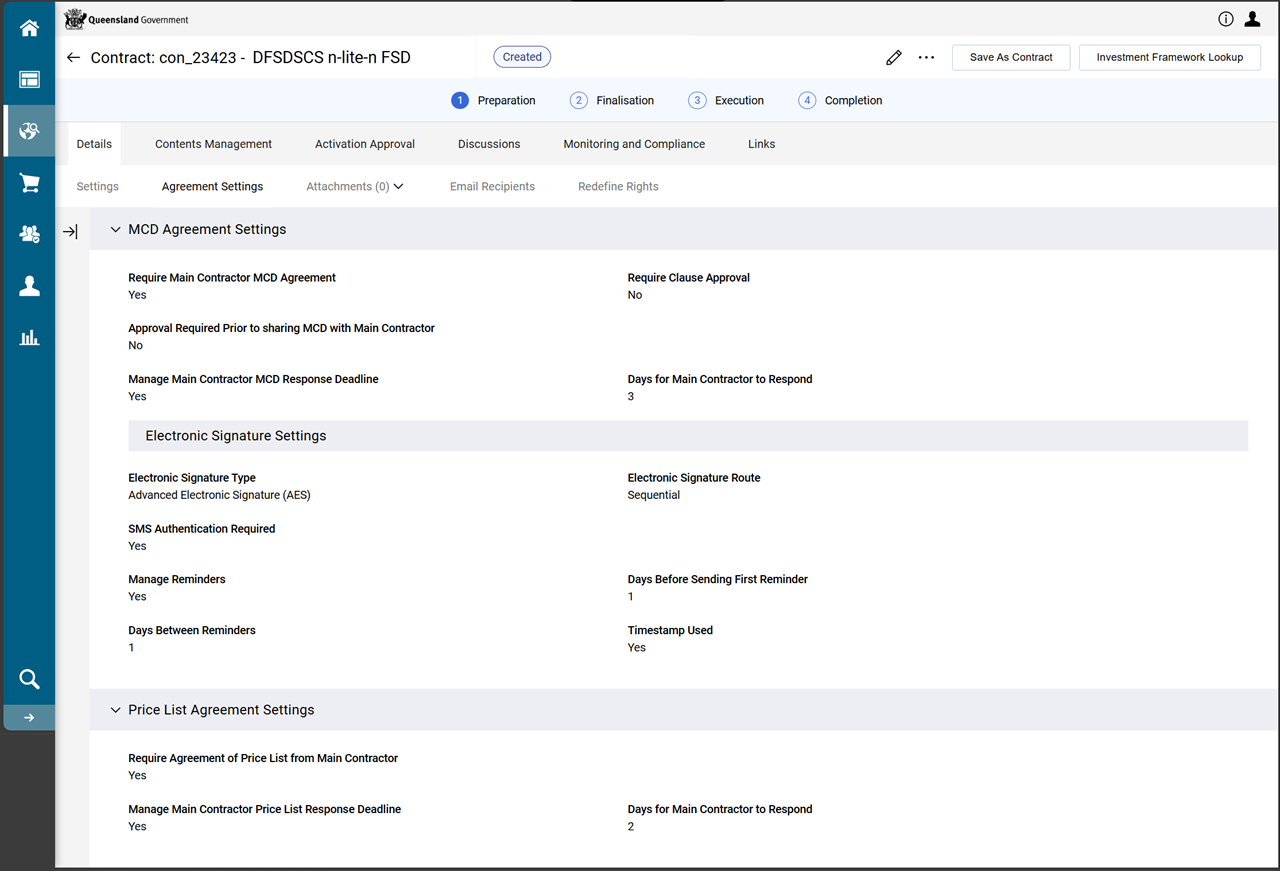
Fields
 MCD Agreement Settings section
This section:
-
displays when selecting Yes or Yes, with Electronic Signature in the Settings tab > Details page > Manage MCD field (refer to Manage MCD)
-
configures if/how the MCD is negotiated with the main contractor (i.e. the Funded Organisation).
| Field name | Description |
|---|---|
|
Require Main Contractor MCD Agreement |
Yes requires agreement (approval) by the main contractor (i.e. the Funded Organisation). Selecting Yes displays the additional fields:
Note Independent of Main Contractor (i.e. the Funded Organisation) engagement in the approval of the MCD, departmental approval is also requested before confirming a version as approved. |
|
Require Clause Approval |
Yes requires each individual clause to be approved rather than the entire contract. |
|
Approval Required Prior to sharing MCD with Main Contractor |
Yes requires departmental approval prior to sharing the MCD. |
|
Manage Main Contractor MCD Response Deadline |
Yes sets a time line for the main contractor (i.e. the Funded Organisation) to respond. Selecting Yes displays the Days for Main Contractor to Respond field. Enter the number of days. |
Electronic Signature Settings subsection
Note This sub-section displays when Yes, with Electronic Signature is selected in the Details tab > Settings page > Manage MCD field. (Refer to Manage MCD)
Independently from this configuration (agreement settings) for both contract document and price list, an internal organisation approval workflow will be required prior a version could be set as approved.
| Field name | Description |
|---|---|
|
Electronic Signature Type |
When selecting Advanced Electronic Signature (AES) the SMS Authentication Required field becomes read-only and automatically set to Yes. |
|
Electronic Signature Route |
Sequential means signatories sign the document one at a time. The name at the top of the list will be the first to sign. Parallel means signatories sign the document at the same time. |
|
SMS Authentication Required |
Yes will require two-factor authentication via SMS. This option requires prior knowledge of the mobile phone number of each signatory. When signing the document, each signatory receives an SMS with a PIN which must be entered to unlock the document for signing. |
|
Manage Reminders |
Selecting Yes displays additional fields which allows for customisation of timeframe reminders:
|
|
Timestamp Used |
Select Yes to enable a timestamp on the electronic signature of the contract. |
Price List Agreement Settings Section
This section displays when selecting Yes in the Manage Prices field on the Settings tab. (Refer to Settings page)
This section helps configure the settings relating to negotiating the price list.
| Field name | Description |
|---|---|
|
Require Agreement of Price List from Main Contractor |
Yes requires price agreement and an additional field displays:
Note Independent of Main Contractor (i.e. the Funded Organisation) engagement in the approval of the price list is requested before confirming a version as approved. |
|
Manage Main Contractor Price List Response Deadline |
Yes to set a time line for the main contractor to respond. Selecting Yes displays the Days for Main Contractor to Respond field. Enter the number of days. |